
Workflows / Controlled change
Change pipelines without changing production blindly.
Build workflow graphs, publish versioned definitions, preview what a deploy will change and where it will run, then roll it out across LyftData Workers — with explicit placement, scaling and a rollback path.
Every production change has a plan. Every release has a version.
Workflows and deployments need a licensed edition: Community+ (no charge) or above. Community Edition runs Jobs directly.
Draft
Published
v8
Plan
preview
Deploy
Running
Desired state
Define what should run. Let LyftData turn it into execution.
You describe the intent once. LyftData plans the change, stages the jobs and keeps Workers aligned with it.
Workflow
the desired state — a versioned graph describing what should run and how data moves.
Deployment
a planned change: what this version creates, updates or removes, and where it runs.
Jobs
the executable units the deployment stages onto Workers.
Workers
the execution environments — grouped for placement and scale.
Workloads
the running state: what is actually deployed, and its health.
Composition
One workflow can coordinate an entire data path.
Workflows are graphs. Fan one producer out to several consumers, or apply control before anything reaches a destination — and scale the parts independently.
Illustrative architecture
A fan-out workflow graph: an ingest step feeds related-data and metrics steps in parallel, which then converge on a clean-and-load step.
Versioning
Production deserves a known-good version.
Publishing a workflow produces a stable, versioned definition. Deploy it repeatedly; roll back by redeploying an earlier one.
A version timeline: v6, v7, v8 — the currently running version — and v9 shown as a possible future version.
Rollback is a deployment decision, not an emergency rewrite.
Plan
See the change before production sees it.
Applying a deploy requires a current plan, so you see what it creates, updates and removes — where each stage will run and how its scaling changes — before anything changes.
DEPLOYMENT PLAN
workflow v7v8
| create | parse-json | new stage, placed on the edge worker group |
| update | mask-pii | actions changed |
| placement change | enrich-geoip | moved from the compute pool to the edge pool |
| stage scale change | normalize | stage scaling changed |
| remove | legacy-filter | no longer in the workflow |
| unchanged | route-siem, route-archive | no change |
- Illustrative deployment plan moving a workflow from version 7 to version 8: create parse-json on the edge worker group; update mask-pii; move enrich-geoip from the compute pool to the edge pool; change the stage scaling on normalize; remove legacy-filter; route-siem and route-archive unchanged.
An illustrative deployment plan moving a workflow from version 7 to version 8: create parse-json, placed on the edge worker group; update mask-pii; move enrich-geoip from the compute pool to the edge pool; change the stage scaling on normalize; remove legacy-filter; route-siem and route-archive unchanged.
Placement & scale
Scale the bottleneck. Not the whole pipeline.
Map each stage onto the Worker pool where it makes sense to run — hot ingestion separated from heavy processing — and scale only the stage that needs it. Separate Worker pools use external Workers (Standard and Enterprise).
Illustrative architecture
A workflow with ingest placed on an edge worker pool, normalize placed on a compute worker pool, and destinations downstream — each stage scaled on its own.
Reuse
Build patterns once. Compose them again.
A job is the executable unit. A blueprint packages a common pattern as a reusable sub-graph. A workflow composes jobs and blueprints into the full data path.
Delivery
The path between stages is part of the design.
How data moves from one stage to the next is a choice, not an accident — tuned for the reliability and cost the pipeline needs, with the planner expanding the right transport underneath.
Desired vs actual
Get runtime back to the state you intended.
The workflow version is the desired state. When runtime drifts from it — a manual change, a failed node — plan the next change and redeploy to bring it back, with events showing what changed.
Workflow version
Desired state
Actual workloads
Running state
Drift / warning
Plan next change
A comparison: the desired state, from the workflow version, against the running state, from actual workloads. Where they differ, that's drift, flagged as a warning. From there, plan the next change and redeploy.
Operate
From desired state to running state.
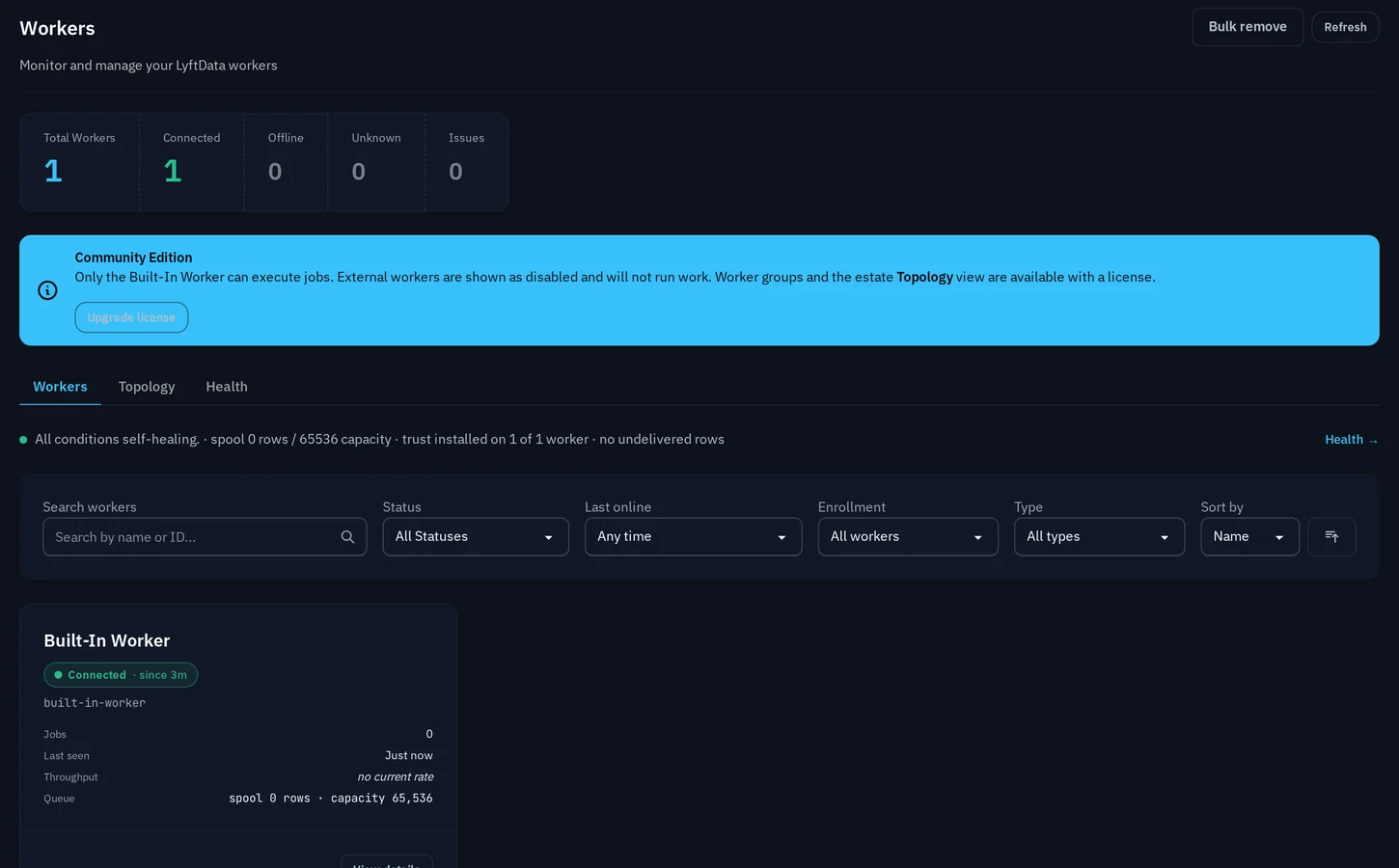
Once deployed, the Workers view shows what's connected and running. This deployment has one built-in Worker; with Standard or Enterprise, add external Workers and place stages across them.
Production control
Every change stays explicit.
Versioned
Published versions don't change — deploy the same artifact again, or an older one.
Previewable
Applying a deploy requires a current plan, so you see what it creates, updates and removes first.
Reproducible
The same version deployed the same way produces the same running state.
Automatable
Planning, deployment and inspection are all backed by APIs.
FAQ
Common questions
Ship the next pipeline change with a plan.
Start on your own infrastructure, or walk through a change with the team.